How to book a Big Norfolk Holiday Fun activity in 2026
As of 2026, the Big Norfolk Holiday Fun programme will be using the Eequ booking platform. This website has been adopted by many other councils delivering their own local version of the Holiday Activities and Food (HAF) programme across the country, and has had excellent feedback from parents and providers alike.
Below is a quick guide to using the Eequ platform, and how you can search, sign up and manage your bookings for Big Norfolk Holiday Fun.





Booking a Big Norfolk Holiday Fun activity on desktop
This handy guide from Eequ shows you step by step how to book a Big Norfolk Holiday Fun activity when using a desktop (computer or laptop).
Booking a Big Norfolk Holiday Fun activity on mobile
This alternative guide shows you how to book a Big Norfolk Holiday Fun activity when using a mobile or tablet device. The process is the same, but looks a bit different visually!
Please note, when each video refers to ‘HAF’, it is referring to the Holiday Activities and Food programme. This is the scheme which runs across the country providing opportunities to children eligible for benefits-related free school meals. Big Norfolk Holiday Fun is Norfolk’s local version of the HAF programme.
Step by step guide of the Big Norfolk Holiday Fun booking process
Prefer to read each step? Not a problem! We’ve listed the booking steps below for you to follow along with. If at any point you encounter any issues, you can get in touch with the Eequ team for support.
Step one: Access the Eequ website
Bookings for Big Norfolk Holiday Fun will be taken via Eequ as of 2026. You can find this website by clicking on the link below.
Step two: Find a Big Norfolk Holiday Fun activity
Once bookings go live, you’ll be able to browse the list of Big Norfolk Holiday Fun activities.
You can choose to show the map and search by activities near you, or use the filters to search for age appropriate activities, those that offer specialist SEND provision and even specific providers if you already know what your child wants to attend!
You can find out more about each activity by clicking on the listing, where a new page will open up. This new page will also have the option to contact the provider directly with any questions you have.
Step three: Book your chosen activity
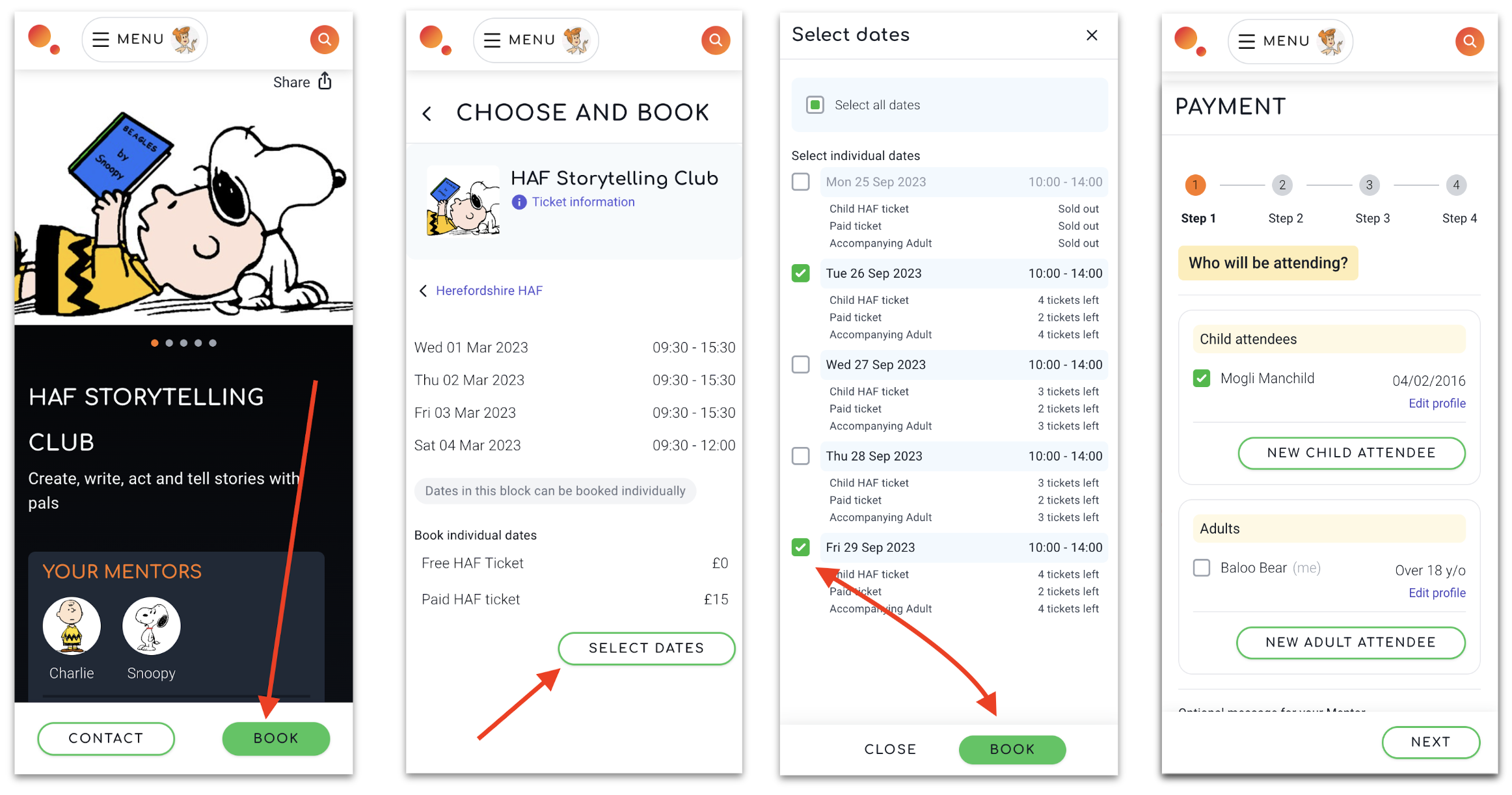
Once you’ve chosen the activity your child(ren) would like to attend, it’s time to get booking! When you find the listing that you want to book, the process is simple:
- Select your chosen activity.
- Click ‘book’.
- Select the date(s).
- Add the names of everyone who is attending.
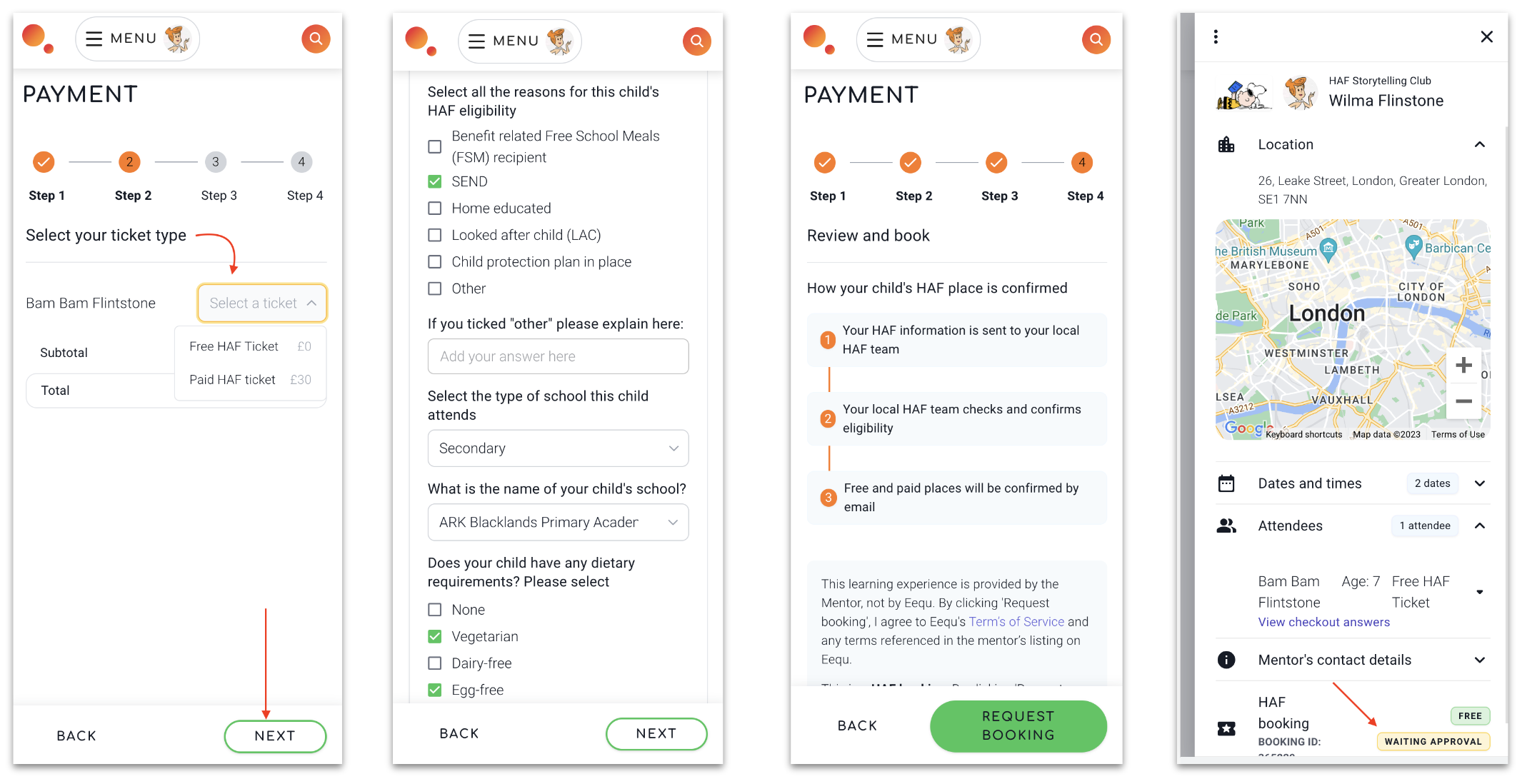
- Select a ticket (if eligible for a free place through Big Norfolk Holiday Fun, select this. The ticket options will be listed on the activity listing.)
- Answer booking questions with as much detail as possible. If you are booking a Big Norfolk Holiday Fun (free) place, you’ll be asked why your child is eligible to claim this. Find out more about eligibility below.
- Request the booking. This will then be checked against our eligibility checker, and you will receive an email when your bookings are confirmed.
Step four: Await booking confirmation
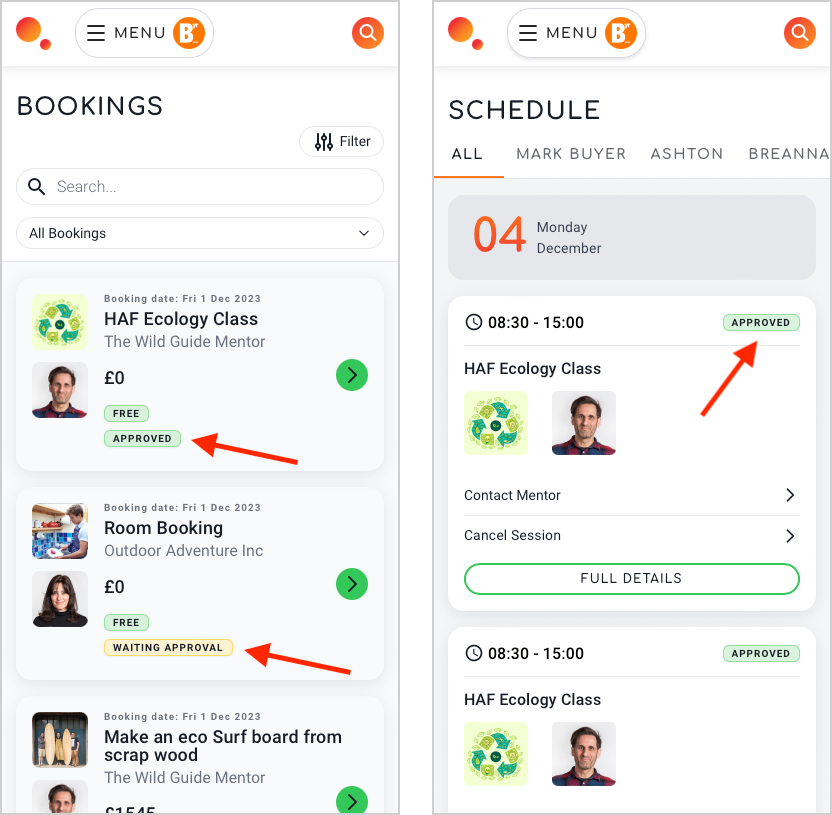
Once you’ve made a booking request, simply sit back and wait for your booking to be approved.
All bookings will now go through our eligibility checker to make sure those claiming free spaces are eligible for them. Please note, your child’s place is not confirmed until you receive confirmation.
Once your booking has been approved, you’ll receive an email letting you know, and you can login to your Eequ account at any time to view the status of these.
How can I amend or cancel my booking?
Amending or cancelling your Big Norfolk Holiday Fun booking is easy with Eequ:
- Log in to Eequ (You can also view your listings on your schedule page or your booking page – you will need to have created an account and logged in)
- Open your menu and go to ‘cancel’
- Select the listing you wish to cancel
- Select the attendee(s) you want to cancel
- Select all dates that you want to cancel
- Add a message to explain why you are cancelling. This is required and helps us to understand any barriers in place to attending provisions
- Check you have selected the correct attendee and dates before confirming – this cannot be undone!
- Click the confirm button
I need to speak to an activity provider
If you have any questions about the venue or activities use the ‘contact’ button on the listing. Your message will go directly to the provider who can contact you directly.
If you are having troubles using Eequ, you can email [email protected] for support making your booking. Please note, this is for technical queries only, they will not be able to answer any questions about your eligibility or specific activity enquiries.
I need help with something else
Please ensure you have checked out the FAQ section on the Big Norfolk Holiday Fun page as we do try and answer all questions here.
If you still require help, you can get in touch with our team using the following details.
Big Norfolk Holiday Fun team
Get in touch with the BNHF team for any questions relating to Big Norfolk Holiday Fun eligibility, welfare or support. For specific activity enquiries, please contact the activity provider directly through the details listed on Eequ.